Give your app a backend in minutes

Add functions, queues, scheduled jobs, state and file storage through one API key. Build from Cursor, Claude or any HTTP client without setting up cloud infrastructure.

  • One API key
  • Six composable primitives
  • Standard HTTP
  • No credit card
  • Deploy through MCP
Compose primitives
JavaScript
// Upload file → Store metadata → Enqueue job → Function processes
const BASE = 'https://api.rocketstack.sh';

// 1. Upload file to Storage (multipart)
const form = new FormData();
form.append('file', file);
form.append('path', 'uploads/report.pdf');
await fetch(BASE + '/storage/objects', {
  method: 'POST',
  headers: { 'Authorization': 'Bearer API_KEY' },
  body: form
});

// 2. Store metadata in KV (key in path)
await fetch(BASE + '/kv/items/file-report-pdf', {
  method: 'PUT',
  headers: { 'Authorization': 'Bearer API_KEY', 'Content-Type': 'application/json' },
  body: JSON.stringify({ value: { uploaded: Date.now() } })
});

// 3. Enqueue to queue (queue has deliveryTarget → function)
await fetch(BASE + '/queues/qu_xxx/messages', {
  method: 'POST',
  headers: { 'Authorization': 'Bearer API_KEY', 'Content-Type': 'application/json' },
  body: JSON.stringify({ payload: { file: 'report.pdf' } })
});

// 4. Schedule nightly sync via Cron
await fetch(BASE + '/cron', {
  method: 'POST',
  headers: { 'Authorization': 'Bearer API_KEY', 'Content-Type': 'application/json' },
  body: JSON.stringify({
    name: 'nightly-sync',
    schedule: { expression: '0 2 * * *' },
    deliveryTarget: { type: 'function', functionId: 'fn_sync' }
  })
});
Storage KV Queue Function

How it works

From account to live workflow

Create an API key, choose how you want to build, and deploy without configuring cloud infrastructure.

01

Create your account

Get an API key and access every RocketStack primitive.

One account and one credential for the complete platform.

02

Build your way

Use standard HTTP, official SDKs, or an MCP-enabled coding client.

03

Deploy and operate

Create a primitive or compose a complete workflow, then manage it from the RocketStack console.

WebhookQueueFunction

All core primitives are available on the Free plan.

Compare approaches

Choose the backend approach that fits your team

RocketStack sits between limited frontend add-ons and building a complete cloud platform yourself. Keep your existing frontend while adding production-ready backend capabilities through one operating model.

Frontend platform add-ons

Works well when

You only need simple request-response endpoints close to your frontend.

The tradeoff

Background jobs, retries, scheduling, state, and file processing quickly become fragmented or require additional services.

With RocketStack

Keep your frontend where it is and add the backend capabilities it is missing through one API.
Specialist backend vendors

Works well when

You need one specific capability and do not expect the backend to grow much further.

The tradeoff

Each new requirement introduces another account, SDK, API key, dashboard, billing model, and integration.

With RocketStack

Use functions, queues, scheduling, state, and storage through one account and one API key.

Building directly on AWS

Works well when

You have dedicated cloud engineers and need complete infrastructure control.

The tradeoff

Your team owns IAM, provisioning, deployments, scaling, monitoring, security, and cost management.

With RocketStack

Use production-ready backend primitives without building and operating the cloud platform underneath them.

Running background work inside your app

Works well when

The work is fast, low volume, and safe to lose when a request fails.

The tradeoff

Long-running requests time out, failed jobs disappear, and retries, observability, and idempotency become custom application code.

With RocketStack

Move asynchronous work into managed, observable workflows with queues and functions.

Start with one primitive, then compose more as your application grows.

Common workflows

Start with the job, not the infrastructure

Choose the workflow your application needs. RocketStack composes the functions, queues, schedules, state, and storage behind it.

WebhookQueueFunction

Reliable webhook processing

Problem

Payment, GitHub, and third-party webhooks can time out or fail when processing happens inside the request.

With RocketStack

Respond immediately while RocketStack queues, retries, and processes the event asynchronously.

Used for

Stripe payment eventsGitHub webhooksCRM callbacksAI job completion events
await fetch(`${ROCKETSTACK_API}/queues/${queueId}/messages`, {
  method: "POST",
  headers: {
    Authorization: `Bearer ${ROCKETSTACK_API_KEY}`,
    "Content-Type": "application/json"
  },
  body: JSON.stringify({
    payload: { type: "payment.completed", customerId: "cus_123" }
  })
});

Build with AI

Describe the backend. Let your coding agent deploy it.

Use RocketStack MCP from Cursor, Claude, Windsurf, or VS Code to create functions, queues, schedules, state, and storage without leaving your development workflow.

  • Describe the outcome

    Tell your coding agent what your application needs in plain language.

  • Deploy real infrastructure

    The agent creates and manages RocketStack primitives through MCP, not just local code.

  • Stay in your editor

    Build, inspect, and update backend workflows without switching between cloud consoles.

Works with MCP-enabled clients

Cursor Claude Windsurf VS Code

Prefer code? Use the same RocketStack APIs through HTTP or official SDKs .

Prompt

Add reliable Stripe webhook processing to this application. Acknowledge requests immediately, queue each event, process it in a function, and retry failed deliveries automatically.

RocketStack MCP
  • Creating queue: stripe-events
  • Deploying function: process-stripe-event
  • Connecting queue to function
  • Enabling retries and observability
  • Workflow deployed successfully
Deployed workflow Ready to receive events
WebhookQueueFunction

Reliable webhook processing is now live without configuring servers, workers, or queue infrastructure.

Example prompts

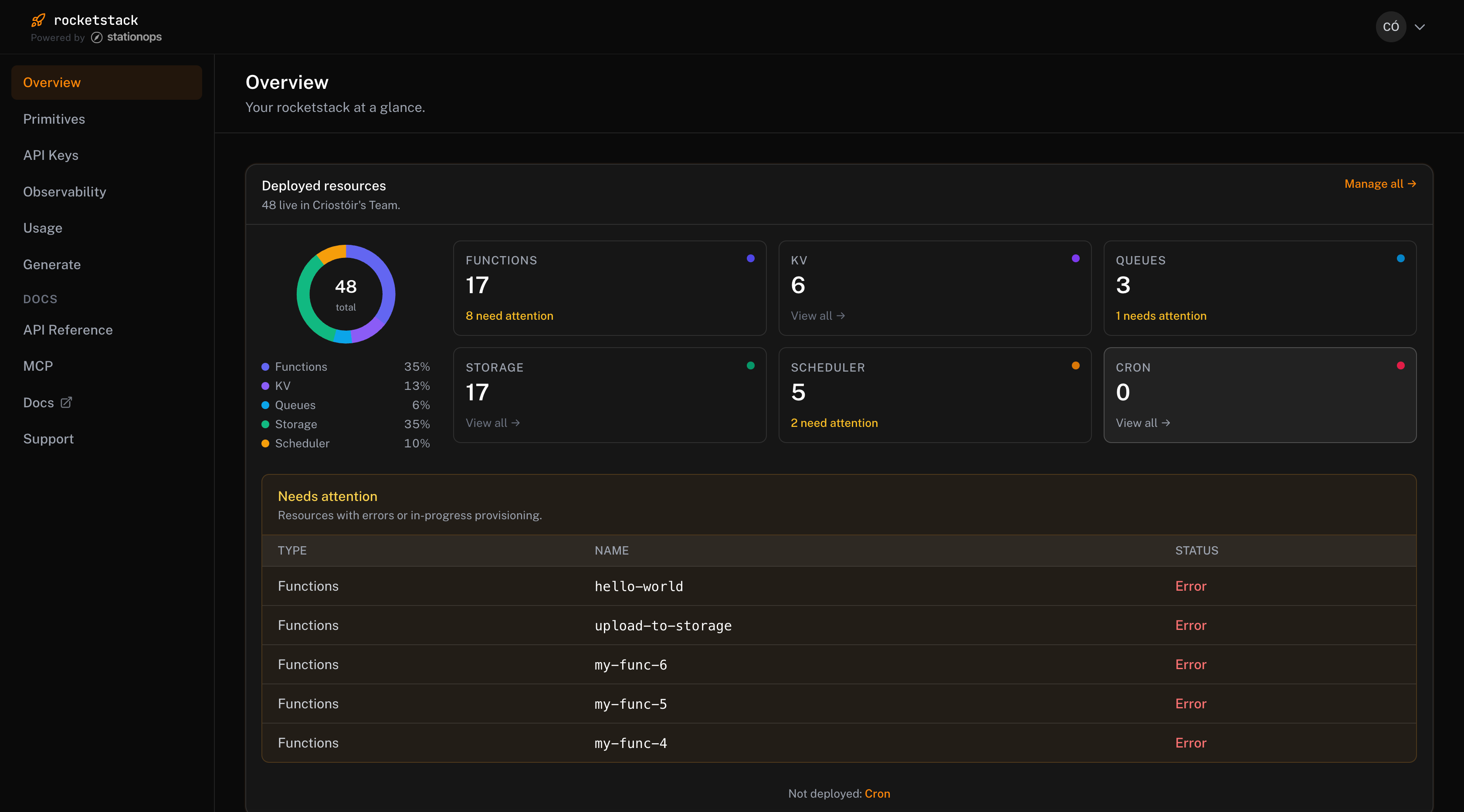
The console

See what is running. Fix what needs attention.

Deploy from code or your AI coding agent, then manage every function, queue, schedule, key, and file from one console.

console.rocketstack.sh
RocketStack console showing deployed resources, primitive counts, and resources requiring attention.

Scroll to explore

Everything in one view

See functions, queues, storage, schedules, cron jobs, and KV resources across your team.

Problems surface immediately

Find failed deployments, provisioning issues, and resources that need attention without searching through cloud consoles.

Operate, not just deploy

Manage API keys, usage, observability, Generate, and MCP from the same workspace.

The primitives

Core backend primitives through one API

Use each primitive independently or compose them into complete application workflows. One account, one API key, and one operating model.

Functions

Run backend code without managing servers or deployment infrastructure.

Used for

  • API endpoints
  • Webhook processing
  • Background jobs
  • Data transformation

Works with

QueueSchedulerCronStorage

Queue

Move work out of application requests and process it reliably in the background.

Used for

  • Webhook processing
  • AI jobs
  • Email delivery
  • File-processing pipelines

Works with

FunctionsStorage

Scheduler

Trigger an action once at an exact time in the future.

Used for

  • Delayed notifications
  • Trial expiry
  • Payment follow-ups
  • User reminders

Works with

FunctionsQueueKV

Cron

Run recurring backend work on a reliable schedule.

Used for

  • Nightly syncs
  • Report generation
  • Data cleanup
  • Recurring maintenance

Works with

FunctionsQueueKV

KV

Store lightweight application state with simple, low-latency API calls.

Used for

  • Idempotency keys
  • Workflow state
  • Feature flags
  • Temporary data

Works with

FunctionsSchedulerCron

Object Storage

Store and retrieve files without managing buckets, permissions, or storage infrastructure.

Used for

  • User uploads
  • Documents
  • Images
  • Processing pipelines

Works with

QueueFunctions

Not sure which primitive you need? Start with a workflow.

Built for production

Infrastructure you can see, understand, and operate

RocketStack gives you the visibility and controls needed to move from a working prototype to a dependable production workflow.

  • Failures are visible

    See resources that fail to deploy or require attention directly in the RocketStack console.

  • Workflows can recover

    Use queues and retries to keep temporary failures from becoming lost application work.

  • Standard interfaces

    Use normal HTTP APIs, generated SDKs, or MCP-enabled coding clients without adopting a proprietary application framework.

  • Usage stays visible

    Track consumption across RocketStack primitives and see how close applications are to their plan limits.

StationOps

Powered by StationOps

RocketStack is built by the team behind StationOps, with experience operating cloud infrastructure for production engineering teams.

Learn about StationOps
  • Standard HTTP APIs
  • Generated SDKs
  • Centralized observability
  • One console for every primitive

Simple pricing

Start free. Upgrade when your application grows.

Every plan includes the same RocketStack primitives and APIs. Choose a plan based on usage, support, and production requirements.

No separate bill for every function, queue, schedule, or storage service.

Free

$0forever

No credit card required

Build and test with every RocketStack primitive.

Best for

Development and lightweight applications

  • All core primitives
  • 5,000 Function invocations
  • API, SDK, and MCP access
  • Console and observability
  • Community support
Most popular

Starter

$29per month

Run production applications with higher limits and direct support.

Best for

Production apps and small teams

  • Everything in Free
  • 100,000 Function invocations
  • Higher limits across all primitives
  • Email support
  • Usage dashboard and alerts

Pro

$99per month

Support growing workloads with larger allowances and priority help.

Best for

Higher-volume and critical workflows

  • Everything in Starter
  • 1,000,000 Function invocations
  • Larger limits across all primitives
  • Priority support
  • Priority incident handling

Enterprise

Custombased on requirements

Custom usage, support, security, and commercial terms.

Best for

Large or regulated workloads

  • Custom usage limits
  • Volume pricing
  • Dedicated technical support
  • Custom service commitments
  • Security and architecture review

Pricing FAQ

Build your first workflow for free

Create an account, get an API key, and deploy from code or your MCP-enabled coding client.

Get started

Get started in 3 steps

Create an account, copy your API key, and build your first backend workflow.

Create your account

Sign up for free and access every RocketStack primitive.

No credit card required.

Get your API key

Copy your key from the RocketStack console and connect your application.

One key for Functions, Queue, Scheduler, Cron, KV, and Storage.

Build your workflow

Call RocketStack from HTTP, an official SDK, or your MCP-enabled coding client.

Start with a primitive or compose a complete workflow.

Build your first workflow

Create a free account, get your API key, and connect your application through HTTP, SDKs, or MCP.